
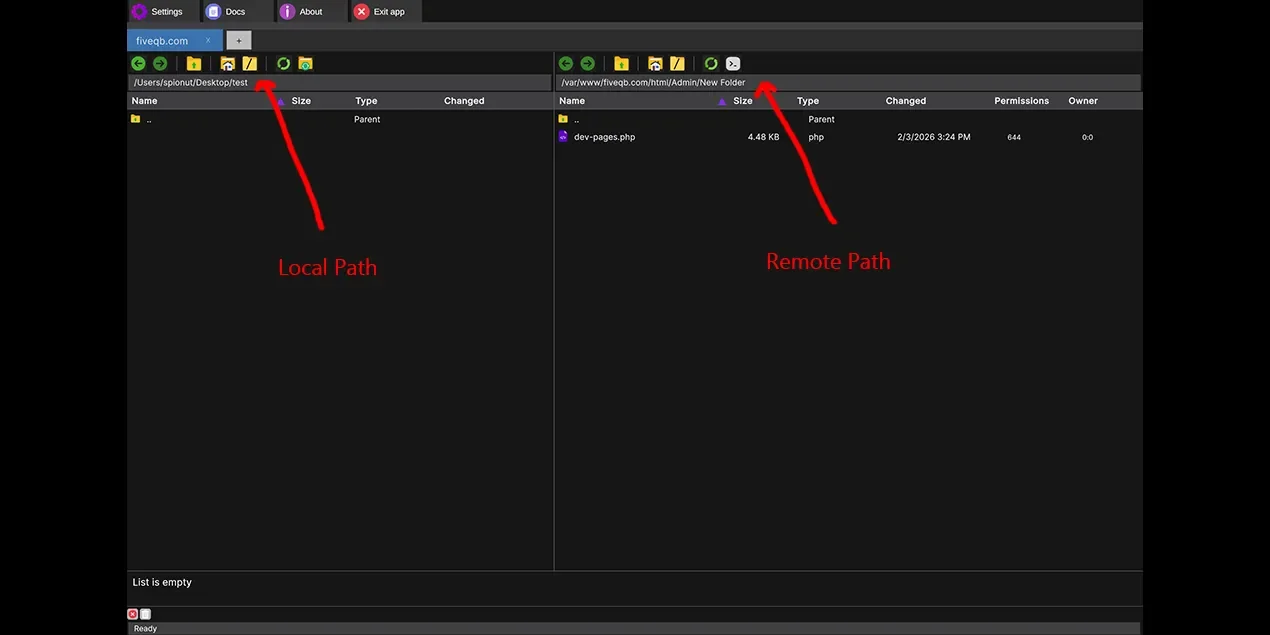
This guide explains how Bookmarks and Path Navigation work in FQB Transfer. You’ll learn how to quickly jump between folders by clicking the path bar, and how bookmarks help you save and reuse frequently accessed locations on both local and remote servers.
Bookmarks Help Menu
What Are Bookmarks?
Bookmarks allow you to save frequently used local or remote paths so you can return to them instantly. Instead of navigating through multiple folders each time, you jump directly to the exact location you need.
Bookmarks work independently for:
- Local folders on your Mac
- Remote folders on FTP, SFTP, FTPS, S3, or WebDAV servers
Open the Bookmarks Dialog
To open the bookmarks dialog:
- Locate the path bar (local or remote)
- Single-click the path once
- The bookmarks dialog opens automatically
From this dialog, you can select an existing bookmark or add new frequently used paths.
Single Click vs Double Click Behavior
Single Click (Bookmarks)
When you click the path once, FQB Transfer opens the Bookmarks dialog. This is designed for quick access to saved locations.
Double Click (Fast Folder Navigation)
When you double-click the path, it becomes interactive. You can instantly jump to any parent folder in the path.
Example path:
root/scripts/- Click root → navigates to
root/ - Click scripts → navigates to
root/scripts/
This makes switching between related folders extremely fast, especially when working on large projects.
Common Use Cases
- Jumping between root and scripts directories
- Switching quickly between config and source folders
- Navigating deep directory trees without losing context
- Replacing manual folder traversal with one or two clicks
Tips for Faster Navigation
- Bookmark folders you visit daily.
- Use double-click path navigation instead of repeatedly clicking folders.
- Keep folder structures clean to maximize path usability.
- Combine bookmarks with tabs for production and staging servers.
Key Takeaways
- Single-click the path to open bookmarks.
- Double-click the path to navigate folder levels instantly.
- Bookmarks save time by eliminating repetitive navigation.
- Path navigation works for both local and remote folders.